AI screenshot generator that still lets you edit
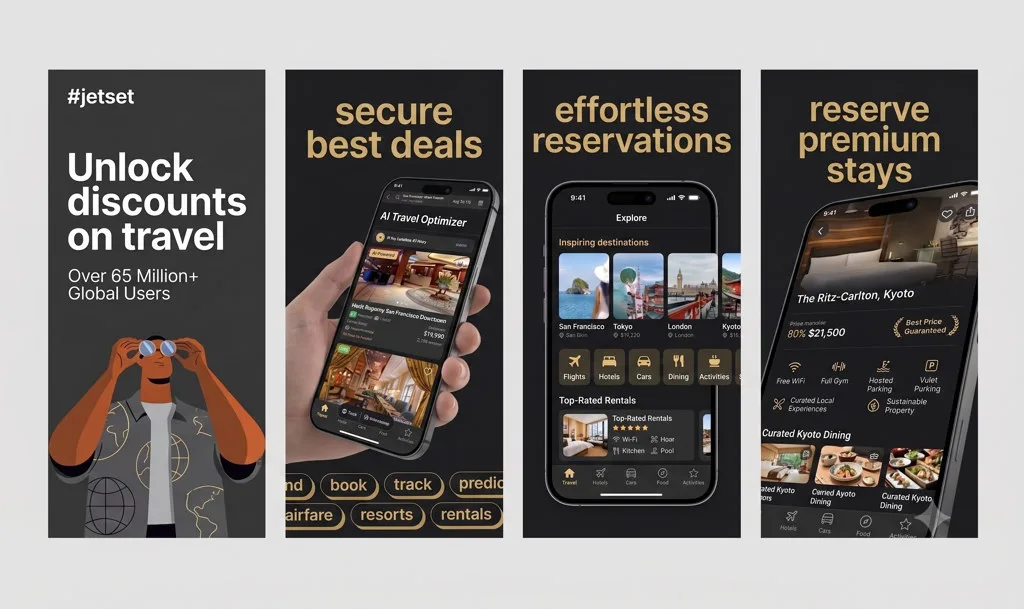
Describe the app. AppGrowthKit AI plans layout, headlines, and backgrounds across your real captures. You stay on a layer canvas until the set is honest and store-sized.
How it works
Give the model the app, not a vibe
Upload screens and say what the product does. AI drafts the sequence, captions, and treatment from that context.
Keep the draft unlocked
Rewrite a headline, swap a frame, or reorder screens. AI accelerates the first pass; it does not freeze the file.
Export exact store sizes
Download App Store and Google Play packs from the same project.
What you get
AI for layout and copy, not fake UI
Apple Guideline 2.3 still requires the current app in the frame. AppGrowthKit generates overlays and composition around your captures.
Faster than browsing 200 templates
Skip the template maze. Generate a category-aware draft, then refine the two or three screens that do the conversion work.
Works next to Grok Bot
Use Grok Bot for competitor research and caption options. Paste the winners into AppGrowthKit and export.
What this AI screenshot generator will and will not draw
An AI screenshot generator that invents the interface fails App Review. AppGrowthKit drafts layout, headlines, and backgrounds around captures from the app you ship. You edit every layer before export.
| Job | AI does it? | Constraint |
|---|---|---|
| Headlines and layout | Yes | Short store copy on your real screens |
| Backgrounds and frames | Yes | Current iPhone, iPad, and Android frames |
| Fake in-app UI | No | Guideline 2.3: the UI must be the current app |
| Store pixels | After you edit | 6.9-inch iPhone sizes, 13-inch iPad, Play frames at 1080px+ |
Apple: upload screenshotsApp Store screenshot generatorScreenshot workflow for developers
Questions
AppGrowthKit is an AI screenshot generator built for store listings: it drafts layouts and copy on your real app screens, keeps a layer editor, and exports App Store and Google Play sizes. General image models can invent UI that fails App Review.
They are strong at research and first-draft captions. They do not export 6.9-inch or Play Console pixel packs. The durable split is: agent writes, AppGrowthKit frames and exports.
No. You review the draft on a multi-screen canvas and change any layer before export.
Related generators
Let AI start the set. You finish it.
Describe the app, generate a screenshot draft, and export store-ready sizes when the set is ready.