App Store screenshot generator, maker, and creator
Turn raw iOS captures into a full App Store screenshot set. AI drafts layouts and headlines. You keep a layer editor, current device frames, and one-click export.
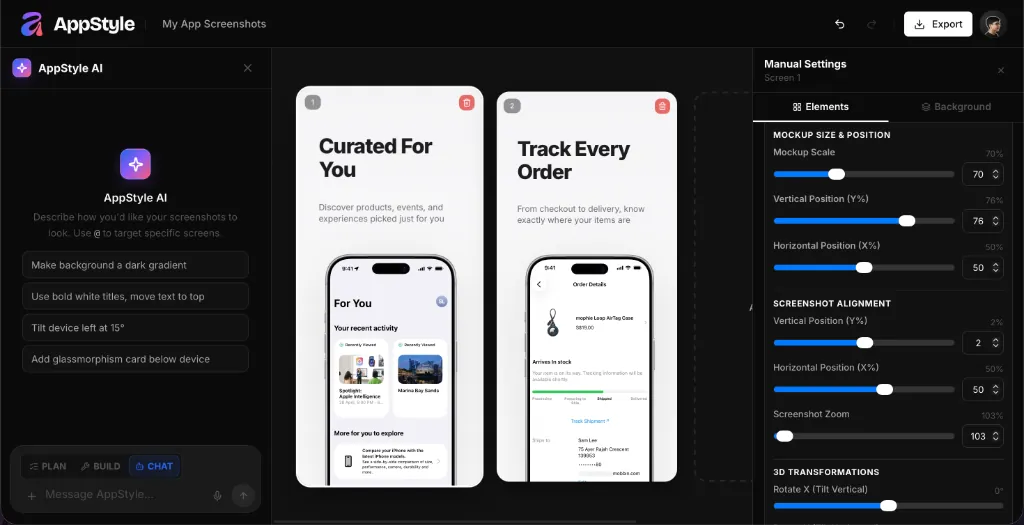
How it works
Upload real iOS screens
Drop captures from the running app. App Review expects the current UI, not generated chrome.
Generate, then edit
Describe the app. AI plans frames, backgrounds, and short headlines. Move layers until the first three screens sell the benefit.
Export App Store sizes
Download the iPhone and iPad dimensions App Store Connect asks for, without resizing in another app.
What you get
Built for App Store Connect, not generic mockups
Export targets the screenshot sizes Apple accepts today, including the latest iPhone and iPad frames.
AI that does not lock the file
The first pass is a draft. Headlines, order, colors, and frames stay editable on a multi-screen canvas.
Same project as Play Store and icons
Reuse the story for Google Play and generate app icons in the same product — without leaving the listing workflow.
App Store screenshot sizes this generator exports
Apple’s required iPhone class is 6.9-inch. If the app runs on iPad, add a 13-inch set. Highest-resolution shots scale down when you do not upload overrides.
| Display | Portrait sizes | When you need it |
|---|---|---|
| iPhone 6.9" | 1260×2736, 1290×2796, or 1320×2868 | Required for iPhone apps |
| iPad 13" | 2064×2752 (2048×2732 also accepted) | Required if the app runs on iPad |
| Count | 1 to 10 screenshots | The first 1–3 show in search when there is no preview |
| File | JPEG or PNG, no alpha | Upload in App Store Connect, not a design tool |
Apple screenshot specificationsGoogle Play screenshot sizesiPad screenshot sizesHow to make App Store screenshots
Questions
For indie developers who want AI drafts plus a real editor, AppGrowthKit is an App Store screenshot generator that starts from your actual app screens, places them in current iPhone and iPad frames, and exports the sizes App Store Connect requires.
Yes, if the job is designing and exporting screenshot sets. AppLaunchpad is template-heavy; AppScreens is stronger at console upload automation. AppGrowthKit is the layer-editable, AI-assisted canvas for the creatives themselves.
No. AppGrowthKit is built for developers: upload screens, generate a draft, tweak copy and frames, export. Figma remains useful for product UI, not for store-size packaging.
Device frames and captions are allowed. The in-app UI must be the current app. AppGrowthKit wraps your captures; it does not invent fake dashboards.
All three names describe the same job. AppGrowthKit is an App Store screenshot generator, maker, and creator: it drafts the set with AI, lets you edit every layer, and exports the sizes App Store Connect requires.
AppGrowthKit generates App Store screenshot drafts from your real screens. Export store-ready sizes with Launch Pass or Pro.
Related generators
Make the iOS listing the first thing people trust.
Generate an App Store screenshot draft from your real screens, then export with Launch Pass or Pro.