Screenshot templates that do not trap you in a grid
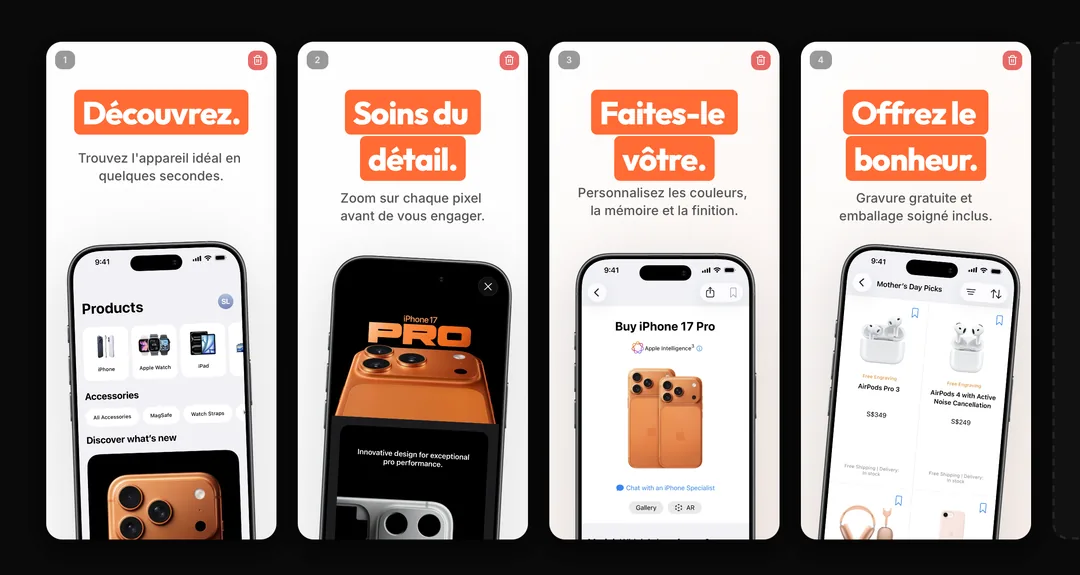
Start from proven store patterns — benefit headline, device, proof — then break the grid. AppGrowthKit uses AI drafts and a layer canvas instead of a locked template picker.
How it works
Start from a store pattern
AI applies a conversion-minded structure: short headline, real UI, clear sequence. You are not browsing hundreds of dated themes.
Treat it like a design file
Move type, swap frames, change backgrounds, and reorder screens. Templates here are starting compositions, not cages.
Export every required size
The same set becomes iPhone, iPad, and Android exports without rebuilding each template.
What you get
High-converting structure, not clip art
The useful “template” is the listing narrative: problem, capability, proof. AppGrowthKit helps you hit that structure on real screens.
Faster than Figma starter files
No store-size artboards to maintain. Generate, edit, export.
Localize the template once
When the master works, generate localized copy for 42 locales on the same layers.
The screenshot sequence that converts, before any theme
A locked template catalog makes you pick a look. The structure that shows up on listings that convert is shorter: one promise, the feature that delivers it, then proof. AppGrowthKit starts there, on your captures, then exports store sizes from the same layers.
| Frame | Job | What to put on it |
|---|---|---|
| 1 | Outcome | A 5–8 word benefit over the real UI |
| 2 | How | The feature that delivers that benefit |
| 3 | Proof | A second flow, or the result the user gets |
| Export | Store sizes | 6.9-inch iPhone, 13-inch iPad if you ship iPad, Play frames at 1080px+ |
Apple product page guidanceAI screenshot generatorApp Store screenshot best practices
Questions
Yes, as AI-generated starting layouts based on how top listings present a benefit, not as a locked theme catalog. You edit every layer before export.
AppLaunchpad is organized around a large template library. AppGrowthKit generates a draft for your app, then gives you a layer editor so you are not picking a look for 45 minutes.
Related generators
Start from a pattern. Finish with your app.
Generate a screenshot structure, drop in real captures, and export store-ready files.