App Store screenshots without hiring a designer
You do not need Figma, Canva muscle memory, or a weekend of templates. Upload the app, generate a draft, fix the words, export the sizes the stores require.
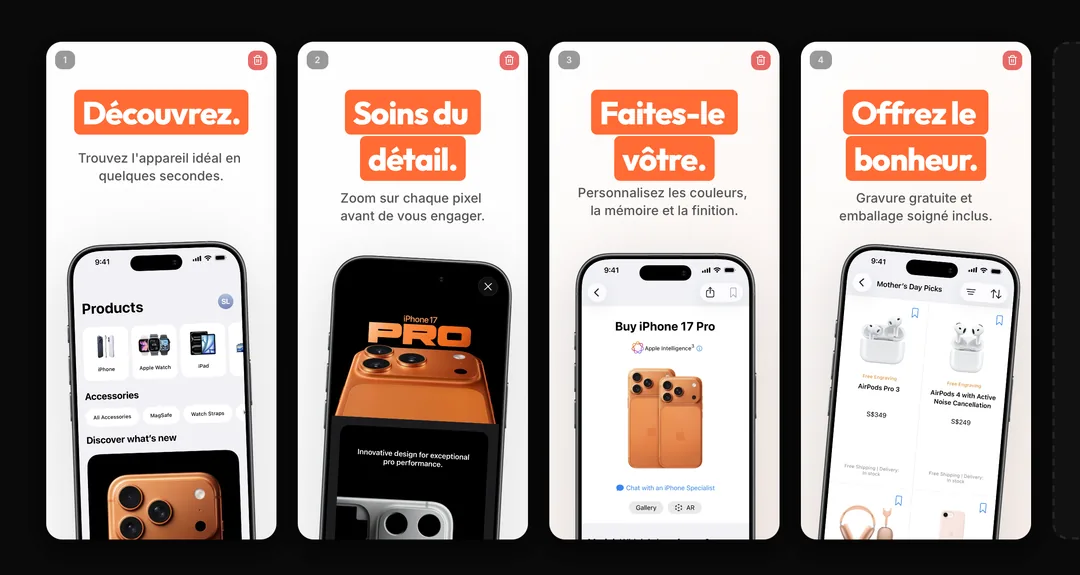
How it works
Upload what you already have
Phone screenshots from the simulator or device are enough. The tool supplies frames and layout.
Let AI write the first headlines
Short, benefit-led lines beat paragraphs. Edit anything that sounds like generic marketing.
Download and submit
Export. Upload to App Store Connect or Play Console. No agency handoff.
What you get
Control without a craft degree
Drag text, change a color, reorder screens. If you can use slides, you can finish a set here.
Cheaper than a one-off design pass
A $9.99 Launch Pass covers one launch. You are not buying a retainer.
Still honest
Pretty frames do not replace the real UI. The product shows your app, then helps the caption do the selling.
What you do, and what the tool does
You do not need Figma or a designer retainer to ship a listing. Phone screenshots from the simulator are enough. The tool supplies frames, a first draft of the headlines, and the export sizes. You fix the words and upload.
| Who | Task | Done when |
|---|---|---|
| You | Upload screenshots of the real app | The UI matches the build you will ship |
| Tool | Frames, layout, first headlines | You can still move every layer |
| You | Edit lines that sound like filler | Each headline is one benefit |
| You | Export and upload | App Store Connect or Play Console has the files |
Launch Pass and Pro pricingEditable screenshot templatesApp Store screenshot generator
Questions
No. AppGrowthKit is built for founders and developers. AI drafts the layout and copy; you make small edits and export.
For store listings, yes. Canva is a general canvas. AppGrowthKit already knows device frames and App Store / Play export sizes.
Related generators
Ship the listing yourself.
Export a store-ready screenshot set without booking a designer.